Comparing Web Servers, Backends, and Rendering Strategies
Category: Web
Around 2020, I built a web app for the first time during an internship. Frontend/backend separation and the cloud were just catching on back then. We used React on the frontend and Spring Boot on the backend, and I had very little idea how a React app actually got deployed once it was built.
On top of that, React basically fuses SPA, CSR, and component-based UI into one thing, while Spring Boot is a backend framework that also bundles concepts like a web server and MVC. All of this left me pretty confused about what the frontend, the backend, and the web server were each responsible for.
This post first discusses how work is split between frontend and backend and how a Web Server differs from an Application Server, then compares different web rendering strategies, using Next.js as an example.
Frontend/Backend Separation
Most tutorials online will tell you that the frontend is responsible for making the UI look nice, typically with React, Vue, or Angular, while the backend is "the Server," handling the messy processes and logic behind the app, written in languages like Node, Java, or Python. That's not wrong, but I think it oversimplifies the concept of a server a bit.
Any process running on a machine that handles requests can be called a server.
- Application Server: What we usually picture as "the backend" seems to go hand in hand with common frameworks like Express, Spring Boot, Flask, and Django. The thing wrapped inside these frameworks (Tomcat) or attached to them (Gunicorn) is what I'll call the Application Server.
- Web Server: There's actually another kind of server that rarely gets mentioned in the frontend/backend separation model, which I'll call the Web Server. Common ones are Nginx and Apache, responsible for static assets, caching, load balancing, and reverse proxying.
| Criteria | Web Server (Nginx) | Application Server (backend) |
|---|---|---|
| Touches the database? | No | Yes |
| Deals with | Network connections, certificates, files, IPs, traffic | Business logic, JSON data, identity and permissions |
| Typical config/language | Nginx config file (nginx.conf) | Node.js, Java, Python, Go code |
Takeaway: I think frontend/backend separation is better understood as "Frontend + Web Server + Application Server," although the lines between them are increasingly blurring.
Reverse Proxy
When the Web Server receives an HTTP request, parses it, and fetches something from the Application Server, that's called a reverse proxy.
Why "reverse" proxy? What's a "forward" proxy then?
An example of a forward proxy is a server set up by a company's IT admin. Every request from company computers has to go through that server, which allows the company to:
- Set up an allowlist to block suspicious websites
- Monitor traffic and log downloads
- Set up caching
Here, the proxy effectively hides the identity of individual computers, letting company computers reach the internet through the proxy. This is called a forward proxy.
A reverse proxy, on the other hand, hides the identity of the application server, hence the name. Reverse or not has little to do with direction; it simply emphasizes who the proxy is serving.
| Whose identity is hidden | Example | |
|---|---|---|
| Forward Proxy | Individual computers (clients) | Company computers all reach the internet through the proxy |
| Reverse Proxy | Application Server | Users only see Nginx, not the backend behind it |
Here's an example Nginx config for routing. I may write a separate post on operating and configuring Nginx in the future:
server {
    listen 80;
    server_name mywebsite.com;

    # Route A: if the URL starts with /api, forward to backend server A (reverse proxy)
    location /api {
        proxy_pass http://backend-server-node:3000;
    }

    # Route B: if the URL starts with /images, grab the image from disk
    location /images {
        root /data/static;
    }

    # Route C: for all other requests, return the React SPA
    location / {
        root /data/frontend-build;
        try_files $uri $uri/ /index.html;
    }
}
A Brief History of Web Apps
| Period | Dominant approach | Representative tech |
|---|---|---|
| 1990–2010 | SSR | HTML/CSS/JS + PHP, Java (JSP), ASP.NET |
| 2012–2018 | CSR, SPA, frontend/backend separation | React / Vue / Angular + Backend |
| 2018–present | Full-Stack Apps, React Server Components, Serverless / PaaS | Next.js + Vercel / Cloudflare |
Client-Side Rendering
The browser asks the server for an HTML shell, then uses JS to fetch data and fill in the page.
Pros:
- Less load on the server: Servers (Application Servers) used to have to fetch the data and assemble the full HTML. CSR hands the job of drawing the page over to the browser.
- Fast subsequent browsing: Apart from downloading a larger JS file on first load, browsing afterward is fast.
CSR vs. SPA
CSR is often mentioned together with SPA (Single Page Application):
- CSR is about "how the page gets rendered"
- SPA is more about the app's architecture, emphasizing "no page reloads and a smooth interactive experience"
Listing the pros of SPA side by side with CSR might make the difference clearer:
- An app-like, smooth experience with no need to repeatedly request new HTML; the UI responds instantly
- Fully decouples frontend and backend
CSR reduces the server's load; SPA makes the user experience smooth.
Server-Side Rendering
Application Servers of the past (PHP, Java, etc.) had to fetch the data and assemble the full HTML, which is called Server-Side Rendering. Frameworks like Spring, ASP.NET, and Django supported development patterns such as MVC and MVVM, so the backend had to take on some responsibility for the UI.
The downside is obvious: whenever any data needs updating, the page has to be redrawn and a new HTML requested, putting a heavy load on the server. That's why CSR stepped in to take over the UI, which also gave rise to the frontend/backend separation architecture.

Then some of CSR's downsides started showing, including:
- Oversized JS bundles, making the initial load too slow
- SEO destroyed: crawlers don't necessarily execute JS, so they may only get an empty HTML shell
- Low-end devices can't keep up
That's what led to things like Next.js and React Server Components. We're now in an era where SSR and CSR are used together.
A common flow looks like this:
- On first load, the page uses SSR to get HTML that already has content (layout, SEO-friendly content), so the user sees the page right away
- Then the JS is downloaded, and events and state are attached to this ready-made HTML to make it interactive. This step is called hydration
- Subsequent navigation and interactions are handled by CSR
Building and Deploying a Next.js App
Most people, after writing their first Next.js app, probably follow the official docs, push it to GitHub with one click, and host it on Vercel.
But for a larger-scale project, we might want to host it on:
- Docker containers: AWS ECS, Google Cloud Run, Azure
- Traditional VPS: something like Linode + Nginx
- PaaS platforms: Render, Fly.io, Railway, AWS Amplify
How to choose among these three is something I may discuss in a future post about deployment.
You might wonder how Vercel or these platforms achieve CSR and SSR. In a Next project, we can run npm run build, which produces a .next folder. Then run npm run start, and a Node server starts up that you can connect to on your machine.
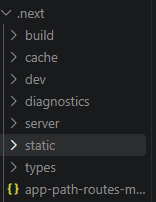
Notice that the .next folder contains two folders, server and static:
server: Code that runs on the server (handling SSR and API Routes), plus HTML pre-rendered at build timestatic: Static assets sent to the browser, such as the JS and CSS files responsible for CSR and hydration
And the Node server started by npm run start does two things at once:
- Runs the code in
serverto handle SSR and APIs → acting as the Application Server - Serves the files in
staticdirectly to the browser → acting as the Web Server
In other words, Next.js is a framework that can do the work of the frontend, the Web Server, and the Application Server.
You don't need to use all of these features to have a good app. For reasons of performance, maintenance, architecture, and so on, we can pull any of these pieces out, for example:
- Hand off serving static assets to Nginx or a CDN
- Hand off database reads/writes or authentication to a separate backend app
- If we only want to use it like React, use Static Export, just like the build from the old create-react-app
Static Site Generation
Pages are pre-rendered into HTML at npm run build time (stored under .next/server). When a request comes in, this ready-made HTML is returned directly instead of re-running SSR every time. It's faster and suits content that looks the same for everyone and doesn't change often.
In the Next.js App Router, as long as a page doesn't use things that "differ for every request," like cookies(), headers(), or searchParams, it automatically becomes SSG at build time, and any fetch inside it also runs once at build time.
Incremental Static Regeneration
Built on top of SSG, ISR lets data that needs updating refresh in the background, without having to rebuild every time the data changes. In Next.js 16, first enable cacheComponents: true in next.config.ts, then use 'use cache' with cacheLife() to decide which data or components to cache and how often to refresh them in the background:
import { cacheLife } from 'next/cache'

export async function getPost() {
  'use cache'
  cacheLife('minutes') // cached data is refreshed in the background roughly every minute
  const res = await fetch('https://api.example.com/post')
  return res.json()
}
Example use cases:
- E-commerce product listings and price pages (may update every few minutes)
- Large news sites (fixing a typo doesn't require a rebuild)
Summary
| Rendering strategy | When the HTML is generated | Where it's generated | Use cases |
|---|---|---|---|
| CSR | Every time JS runs in the browser | Browser | Admin panels, dashboards, and other pages behind login that don't need SEO |
| SSR | On every request | Server | Pages where each user sees different content but SEO is still needed |
| SSG | At npm run build | Build environment | Blogs, documentation, landing pages |
| ISR | At build time, then regenerated periodically in the background | Server | E-commerce product pages, news sites |
Frontend/backend, Web/Application Server, and CSR/SSR are all products of the web's continuous evolution. Although each has its own definition, nowadays they're often used together or mixed. Understanding their similarities and differences is what lets you decide on architecture and technology choices during development.